Short answer: an applicant tracking system (ATS) is software that companies use to collect, sort and search job applications. It reads your resume, turns it into structured data (name, job titles, dates, skills), and lets recruiters filter and search candidates by keywords. To get through it, use a simple layout with standard section headings, save a text-based file, and use the same words for your skills that the job posting uses. ProFitCV templates are built for this, and Match job helps you align your wording with each posting.
This guide explains how an ATS works, which resume mistakes it struggles with, and what you can do about each one.
What is an ATS?#
An applicant tracking system is the database behind a company's hiring process. When you click "Apply" on a careers page, your resume usually goes into an ATS, not straight to a person's inbox. Well-known examples include Workday, Greenhouse, Lever, iCIMS, Oracle Taleo and SAP SuccessFactors.
Recruiters use the ATS to:
- store every application for a role in one place,
- search all candidates by keyword, job title or skill,
- filter by answers to screening questions (for example, work authorization or years of experience),
- move candidates through stages such as "screen", "interview" and "offer".
Most large companies and many smaller ones use one, so it's safest to assume your resume will pass through an ATS.
How does an ATS read your resume?#
It happens in three steps:
- Parsing. The ATS extracts the text from your file and tries to sort it into fields: contact details, work experience, education, skills. This is where layout matters most.
- Storing. The parsed data becomes your candidate profile. If parsing went wrong, your job titles might be missing or your dates attached to the wrong job.
- Searching and ranking. Recruiters search that data with keywords like "project management" or "Python". Some systems also score how well a profile matches the job description.
The key point: a recruiter usually finds you through a search. If your resume doesn't contain the terms they search for, or the ATS couldn't read them, you don't show up, even if you're qualified.
Does an ATS automatically reject most resumes?#
You may have read that "75% of resumes are rejected by ATS before a human sees them." There's no reliable source for that number. In practice:
- Automatic rejections usually come from screening questions ("Are you authorized to work in this country?"), not from the resume itself.
- Most resumes are "rejected" by not being found, because they rank low in a recruiter's search or match results.
So the goal isn't to "beat" the ATS. It's to make sure it reads your resume correctly and that your resume contains the words a recruiter will look for.
How to make your resume ATS-friendly#
Keep the layout simple#
- Use standard section headings: "Work Experience", "Education", "Skills". Creative headings like "My Journey" may not be recognized.
- Avoid tables, text boxes and complex multi-column layouts. Some parsers read them in the wrong order.
- Don't put important text in images or icons. An ATS can't read text inside a picture.
- Keep your contact details in the main body, not only in the page header or footer, which some systems skip.
Use the job posting's keywords#
- Read the posting and note the skills, tools and job titles it mentions.
- Use them where they're true for you, in your experience bullet points and your skills section.
- Write both the full term and the abbreviation once, for example "Search Engine Optimization (SEO)".
- Don't stuff keywords or hide them in white text. Modern systems and recruiters spot it, and it looks dishonest.
Choose the right file#
- A text-based PDF (one where you can select the text) works with most modern ATS software.
- If the posting asks for Word (.docx), send Word.
- Never upload a scanned resume or a PDF saved as an image.
Format dates and titles clearly#
- Use a consistent date format such as "Jan 2022 – Mar 2024".
- Put your job title, company and dates on their own clear lines for each role.
ATS-friendly vs. risky resume choices#
| Element | ATS-friendly | Risky |
|---|---|---|
| Section headings | "Work Experience", "Skills" | "Where I've Been", "My Toolbox" |
| Layout | Single column or simple two-column | Tables, text boxes, overlapping graphics |
| Skills | Written as text | Shown as icons, logos or rating bars only |
| Contact details | In the body of the page | Only in the header or footer |
| File type | Text-based PDF or .docx | Scanned PDF, image, .pages |
| Keywords | Taken from the posting, used honestly | Missing, or stuffed and hidden in white text |
How ProFitCV helps you pass the ATS#
- ATS-friendly templates. Every ProFitCV template uses standard section headings and exports a text-based PDF that ATS software can read.
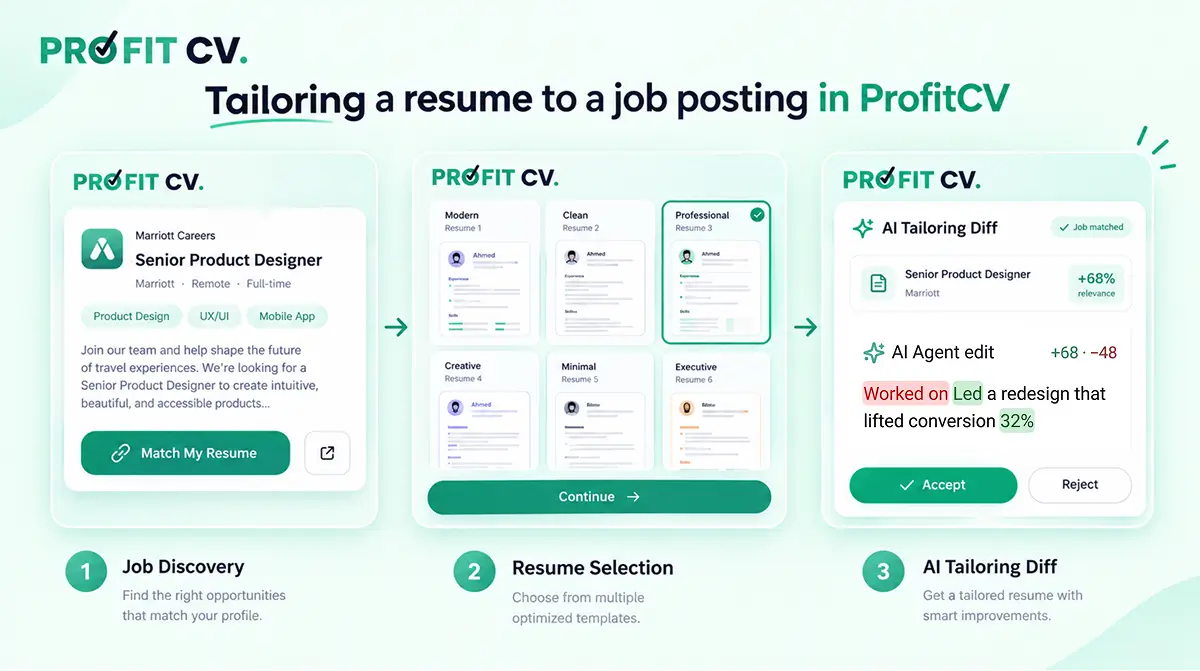
- Keyword alignment. Match job rewrites a work experience entry around the skills and keywords in a job posting, and shows every change before you accept it. See how to tailor your resume to a job posting.
- Built-in job search. Find a role in the Jobs tab and click Match My Resume to tailor your resume against that exact posting.
Frequently asked questions#
Should I send my resume as a PDF or a Word file?#
A text-based PDF works well with most modern ATS software and keeps your layout intact. If a job posting specifically asks for Word (.docx), follow the posting.
Do all companies use an ATS?#
Not all, but most large employers and many small and mid-sized ones do. Assume yours will be read by an ATS first.
Can an ATS read a two-column resume?#
Modern systems usually handle a simple two-column layout. Tables, text boxes and heavy graphics cause more problems. If you're unsure, a single-column layout is the safest choice.
How many keywords should my resume have?#
There's no magic number. Include the main skills and tools from the posting that you really have, in natural sentences and in your skills section. Relevance matters more than repetition.
Does hiding keywords in white text work?#
No. The ATS reads hidden text as normal text, so recruiters see it in your parsed profile, and it can get your application flagged or rejected.
How can I check if my resume is ATS-friendly?#
Copy all the text from your PDF and paste it into a plain text editor. If it comes out in the right order, with your headings, titles and dates intact, an ATS will most likely read it correctly too.
Try it#
Pick an ATS-friendly template, fill in your experience, then use Match job to align it with the posting you're applying for. Start with the free resume builder.